
#12 Digital Skills (Part 2 of 2) — Make One Thing Run Without You
At 6am, a short brief was already waiting in an HR business partner's inbox.
Overnight, the machine had pulled the people numbers for their business unit — headcount and tenure, time off and overtime, the latest engagement pulse, the roles open in the pipeline — set them against the past few months, and written them a note: one team's engagement has slipped three weeks running while its overtime keeps climbing, and here are three things worth checking before it turns into a resignation. They read it over coffee. And they wouldn't dream of acting on it unread.
That gap — between work done and work approved — is the whole subject of this edition.
Last week was the big picture of Digital Skills: why the shift is real, and why no one gets to sit it out. This is the practical half — field ⑩ again, the Daily Business side of the canvas. Less about whether to engage, more about what to actually build.
(New here? Download the canvas for free: https://www.digital-leader-program.de/en/digital-leader-program-digital-leader-canvas)
The canvas asks:
What processes around my team should I automate? What can AI actually do for me and my team? Which processes can be connected via software? And what skills do I need to work well in remote setups?
Start with the process, not the tool
The mistake most people make is to begin with the software. They open a shiny tool, poke at it, and wait to be impressed. Start the other way round: with the work.
Look at your week and find the tasks that repeat, follow rules, and need little judgment — the status report you assemble from the same five sources, the data you copy from one system into another, the first draft that always takes the same shape. In the Delegation edition I offered three filters for any task: kill it, automate it, or delegate it. This is the automate pile, and most people's is far larger than they think.
Then climb the ladder, which I sketched in that same edition and won't repeat in full here. A single task handed to AI is the bottom rung. A connected workflow — several steps chained across different apps so a whole sequence runs itself — is the middle. An agent, handed a goal and left to work out the steps, is the top. The leap that changes your week isn't the clever single prompt. It's connecting the steps so the sequence runs while you sleep.
A quick reminder for HR and L&D readers: the six-month partnership I described last week — a set number of flexible days a month across coaching, consulting and workshops, one organisation at a time — has a place opening from September. If continuity beats one-off sessions for you, a short call is the way in: book 20 minutes.
What to build — and what you may already have
Before you rush up that ladder, a caveat that saves a lot of wasted effort — because it's where most of this advice goes wrong: you may already own the tool that does the job. Modern HR platforms — Personio, Workday and the rest — can already produce most of these analyses: attrition trends, engagement over time, time-to-hire, overtime by team. The capability is sitting there, paid for.
The honest problem is that it mostly goes unused. The reports could be run; in practice they aren't. People export to a spreadsheet and rebuild by hand the very view the system would generate at a click — because no one set it up, was shown how, or made the time. So the first automation win in most organisations isn't building something new. It's finally using what you have.
Underneath that sits a pattern worth naming. In younger companies, younger leaders tend to be strikingly open — they poke, they probe, they assume there's a better way and go looking. Too often I meet senior leaders who quietly assume they can carry on as before: they don't give automation the attention it needs, or they badly underestimate the time it takes to set up well — so the capable software they pay for gathers dust. That isn't a technology gap; it's a leadership-attention gap, and it's the more dangerous one, because it stays invisible until a faster competitor makes it plain.
So where does building your own actually earn its place? In the gaps between tools. Your HR system sees one slice, your engagement survey another, your recruiting tracker a third — and none of them talks to the others. That synthesis is what no single vendor gives you, and what a general-purpose AI agent can: you instruct it in plain English and set it on a schedule, no node editor needed. I run automations like this for my own numbers; the version I'd build for a People team is the brief that opened this edition — stitched together overnight from sources that otherwise sit in separate windows. The shape, in four steps:
- Pull. It gathers the latest figures from the team's sources — the HR system, time and attendance, the most recent engagement survey, the recruiting tracker. Some it can reach directly; some, where a system offers no clean way in, it has to fetch the long way round. (Real automation is messier than the demos admit.)
- Store and show. It keeps the figures in one place — this month beside last month and the quarter before — and refreshes a single dashboard, team by team. The history is the point: one engagement score tells you little; the same score sliding for six weeks tells you a story.
- Reflect and research. It reads the trends, flags what's moved — and, the part that makes this more than a report, researches proportionate steps a manager could actually take where the risk is rising.
- Deliver. It leaves the dashboard and a short written brief waiting in the morning.
One rule to build in from the start: keep it at team level, never the individual — no names, no singling anyone out. Partly because that's where the useful pattern lives, partly because it keeps you the right side of GDPR (more in a moment). Step three is where this stops being a glorified spreadsheet and becomes an agent: it isn't shuffling data, it's reasoning about it. And that quality lives entirely in the instruction, which might read, roughly:
You are my people-analytics partner. Below are one team's aggregate figures for the past six months: headcount and tenure mix, time off and overtime, engagement pulse scores, and open vacancies. Tell me what's moved and what most likely explains it. Then propose three specific, proportionate actions a manager could take to address the biggest risk, ranked by effort against likely impact. British English, no hype. Never name or single out an individual, flag anything you're inferring, and never invent a number.
Notice those last instructions. You make the machine point at its own weak spots, because a human has to catch them — and with people data, an invented figure or a singled-out name is far worse than none.
And notice what it does not do: it doesn't message a manager, change a rating, or put anyone on a list. The human sits at both ends — the team sets what matters at the start, a person decides what to act on at the end. The gathering, the watching and the first-draft thinking in between, the machine can have. (For decisions about people, that human judgment isn't just good practice — the law increasingly requires it.)
The same pattern fits almost any people process you rebuild by hand: the recruiting funnel, onboarding completion, the monthly headcount and attrition pack — each a flow waiting to be built, with a person reading the result before anything happens.
The catch every European has to build in
Here is where this gets less universal and more local — and where a lot of breezy advice quietly fails.
The people data in that example is exactly the kind you can't be casual with. Before you connect two systems, ask what you're allowed to connect. Much of my work sits under NDAs; data can't simply be piped through whatever tool is convenient this month. So the first question of any automation isn't "can the software do it?" but "whose data is this, where will it travel, and do I have the right to send it there?" Get that wrong and the efficiency gain is the least of your problems.
Europe makes this sharper than the US, and on purpose. GDPR already governs what you may do with personal data, and the EU AI Act now layers rules on top by risk. The detail that matters most to anyone reading this: AI used in employment and hiring is classified as high-risk under the Act — exactly the category with the heaviest obligations. The timeline is itself in motion. General-purpose AI rules began applying in August 2025; most remaining provisions are due in August 2026; and the high-risk obligations, originally set for then, look set to move to December 2027 under the "Digital Omnibus" simplification package — provisionally agreed in May 2026 and endorsed by the European Parliament in June, with final sign-off from the Council still pending. Treat the date as firming up, not yet fixed.
None of this is a reason to wait. It's a reason to build with the question switched on from the start. The leaders who treat compliance as a design input, not an afterthought, are the ones who'll still be standing when the rules land.
Working well when no one's in the room
The canvas also asks what skills remote work demands — and automation quietly answers part of it. So much of what we used to gather for is information transfer, and that's exactly what a good workflow removes: when the status updates itself in a shared place, you stop meeting to find out what happened. (The Meeting Moderation edition made this case in full.)
What's left for the remote professional is harder and more human: writing clearly enough that work survives without a meeting, documenting so others can pick up where you left off, being reachable in a way that builds trust across a screen. Tools handle the transfer; you handle the connection — and connection, over distance, is a skill you can practise on purpose.
Why building all this doesn't remove you
It's tempting to think the endpoint of automation is a business with no people in it. I don't believe that, and the clearest thinking I've seen on why comes again from Dan Shipper of Every, whose argument I borrowed last week.
His distinction is worth holding onto: today's systems have autonomy but not agency. They can run a task you set them, even one that takes hours. What they don't have is ends of their own — wants, judgment about what is worth doing at all. Spend ten minutes with a toddler, Shipper notes, and the gap is obvious: the toddler is far worse than any model at every task, and infinitely ahead in one respect — the child wants things, invents goals, decides what matters. The machine waits for a prompt.
That's why every agent needs a human right now, and why automation creates work rather than erasing it. Someone has to point each system at the right thing, judge whether the output is good, and step in when it drifts — because drift it will. A workflow breaks when an app changes; an agent quietly degrades as the world moves on. Building one isn't "set it and forget it." It's "set it and watch it." You don't vanish from the work; you move up a layer — from doing the task to running the system that does it, and owning the result either way. As I argued in the Delegation edition, that last part doesn't transfer: the machine can take the task, never the responsibility.
So the skill this whole field is really asking you to build is double. The fluency to make these tools do real work — and the judgment to stay the framer, not the framed.
Your turn
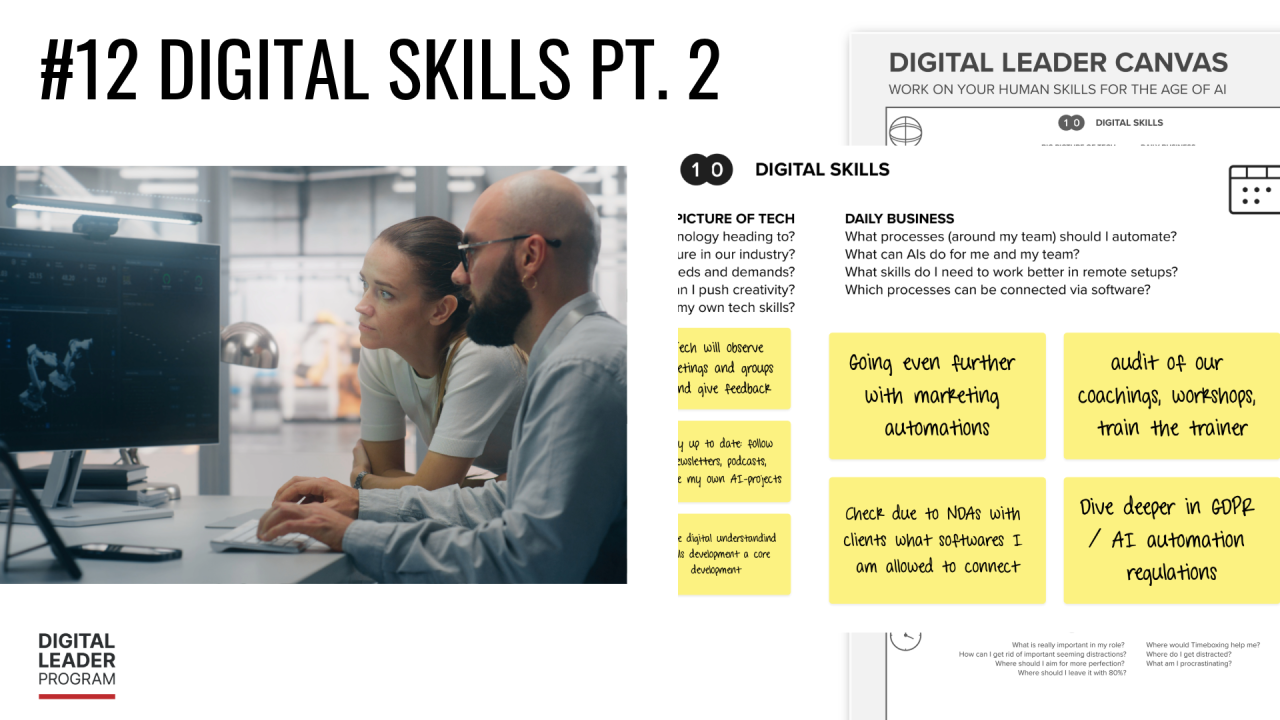
You'll find my own answers in the cover image — the marketing flows I'm automating, the audit I'm running on our own coachings and workshops, the data and GDPR questions I'm working through before I connect anything.
Your 1% this week is smaller than building anything: open one tool you already pay for — your HR platform, your CRM, your analytics — and find a single report or view it can already produce that you currently assemble by hand. Switch it on. That's the cheapest automation there is, and the one most people walk straight past.
If that's already done, take the next rung: pick a recurring task and map it as a handful of boxes on a single sheet — what sets it off, what it pulls in, what it does to that, where the result lands. Don't build it yet; just see whether it could be. That map is the skill; the tool is the easy part.
And if you've gone further still: wire up one simple flow, with yourself reading the result before it goes anywhere. Clumsy and working beats elegant and imagined.
And before you go: what's the one process in your week you'd most love to never do by hand again? Reply or drop a comment — the answers tend to be the same ones half your industry is quietly sick of too.
That closes the canvas on Digital Skills. Next week we reach the final field — ⑪ Communication — and with it, the end of this series.
See you then.
The Digital Leader Canvas is free for individual use. And if you're in HR or L&D and want to bring these themes into your organisation, here's that link again — book a 20-minute call. You can also explore the Leadership Essentials Workshop Series for teams.
Recent Posts
Categories
All categories
KNOWLEDGE THAT WORKS IN PRACTICE
This is not a place for buzzwords. Or for theories that don't hold up in real life. Our blog is a space for leaders and professionals who are looking for genuine answers to genuine questions: How do I lead better in a hybrid environment? How do I communicate in a way that actually lands? How do I use AI meaningfully in my daily work? How do I build resilience in my team?
Every article in the Digital Leader Program blog is designed to be directly useful – with insights, methods and examples you can take straight into practice.
TOPICS THAT MATTER TODAY
Leadership in the digital age: How is leadership changing when teams work remotely or hybrid? What do new leaders need – and what do experienced managers need to relearn?
Human Skills under AI influence: Which human capabilities become more important as AI takes over routine tasks – and how do you develop them deliberately?
Hybrid work in practice: Concrete tips, rituals and tools for productive hybrid collaboration – what actually works, and what doesn't.
Culture Design and team dynamics: How do you build an organisational culture that attracts, retains and energises people?
Communication and feedback: The capabilities that separate average performance from real high performance.
FROM PEOPLE WHO WORK IN PRACTICE
Our articles are written by Andre Ottlik and our team – people who work in coaching sessions, workshops and training every single day. What you read here is not copy-pasted from academic studies, but knowledge drawn from lived practice.
And occasionally we feature contributions from external experts sharing insights from their own fields – such as the piece with Pascal Baumgartner on hybrid meeting optimisation.
FREQUENTLY ASKED QUESTIONS (FAQ)
How often are new articles published?
Regularly. Subscribe to our newsletter or follow us on LinkedIn to make sure you don't miss new content.
Are articles available in German too?
Yes. Many of our articles are also available in German – particularly on topics relevant to German-speaking leaders and organisations.
Can I suggest article topics?
Absolutely. Write to us or bring it up in a conversation – we welcome input from our community.
How can I go deeper than the blog?
Our workshops, coaching programmes and the podcast "3 minutes max." go further and support you systematically in your development. Browse our service pages or book an initial consultation.
Author
Andre Ottlik
Author
Andre and his Team are the authors of Digital Leader Programs Blog Posts
